Get Results API
The Get Results API retrieves results from a test or plan that has
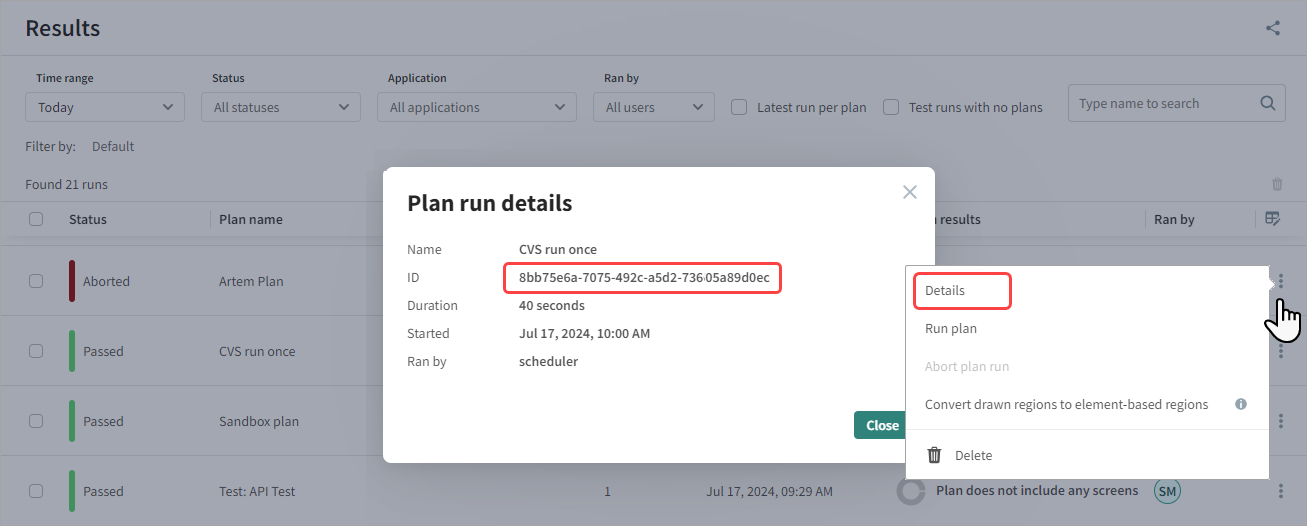
previously run. To use this API, you need the plan run ID, which you can
find on the Results page. Next to a result, click
 >
Details.
>
Details.
By default, your personal API key does not have read permissions. If an administrator has not modified these permissions and your API key lacks read access, you will also need a read token, which is available from the Execute Plan API results.
Syntax
If you use a customized API key with read permissions:
GET /api/result/{run_id}?apiKey={api_key}
If you use an API key with default permissions:
GET /api/result/{run_id}?apiKey={api_key}&read_token={read_token}
Parameters
| Parameter | Type | Represents |
|---|---|---|
| run_id | String | The unique identifier for a specific plan or test run |
| api_key | String | The API key. For details, see REST APIs. |
| read_token | String | The token required to read the results if your API key lacks read permissions. |
For an example of how to retrieve the plan run ID and read token, see Execute a Plan or Test API.
Example of GET Command
The following command returns details of a plan:
GET /api/result/3fa85f64-5717-4562-b3fc-2c963f66afa6?apiKey=AuoT101103alCTIDKifxP7oJOJLcNgNI110uujevqI3V16NeM110
Output
The API returns the results of the plan run:
{
  "result": {
    "id": "ac247a18-75d5-4094-8ab3-56788d6d2ff9",
    "name": "autonomous-testapp.azurewebsites.net plan",
    "application": "autonomous-testapp.azurewebsites.net app",
    "status": "failed",
    "environments": [
      {
        "name": "env-name_lvc0ei",
        "os": "Linux",
        "viewport": "1442x3227",
        "device": "Desktop",
        "browser": "Chrome"
      },
      {
        "name": "firefox_ltr6xexec",
        "os": "Linux",
        "viewport": "690x490",
        "device": "Desktop",
        "browser": "Firefox"
      },
      {
        "name": "Chrome",
        "os": "Linux",
        "viewport": "1440x900",
        "device": "Desktop",
        "browser": "Chrome"
      }
    ],
    "started_at": "2023-10-24T13:00:12.463Z",
    "duration": 228669,
    "results": {
      "failed": 3,
      "passed": 12,
      "aborted": 0,
      "pending": 0,
      "unresolved": 0
    },
    "tests": [
      {
        "id": "fcc41ac2-95e6-4fed-93d1-c609483300e4",
        "name": "autonomous-testapp.azurewebsites.net",
        "status": "failed",
        "type": "sitemap_test",
        "sitemap": "https://autonomous-testapp.azurewebsites.net/sitemap.xml",
        "results": {
          "failed": 3,
          "passed": 12,
          "aborted": 0,
          "pending": 0,
          "unresolved": 0
        }
      }
    ]
  }
}
Step Types and Fields
Each test in the response contains a list of steps. Every step has a type field indicating what kind of step it is:
| Step type | Represents |
|---|---|
openpage | The first navigation step that opens the test URL. |
checkpoint | A visual check — a screenshot comparison against the baseline. |
nlp | An action step, such as "click OK button". |
A checkpoint step carries the following additional fields:
| Field | Type | Represents |
|---|---|---|
match_level | String | The match level applied to this checkpoint. One of Dynamic, Strict, Layout, Ignore colors, Regions only. |
capture_type | String | What portion of the page was captured, for example FullPage. |
dynamic_ignore_patterns | Array of String | Present when match_level is Dynamic. Lists the predefined and custom pattern names that were active for this step (for example, Date, OrderNumber). |
Example of a Dynamic checkpoint step
The following example shows a checkpoint step that was evaluated with the Dynamic match level and a custom pattern named OrderId-pdf-dkome:
{
  "type": "checkpoint",
  "name": "test 1so14 - pdf-dynamic-custom - Step 2",
  "match_level": "Dynamic",
  "capture_type": "FullPage",
  "dynamic_ignore_patterns": ["OrderId-pdf-dkome"]
}
Failure Details
There is no per-step failure reason in the response. Failures and unresolved results are reported in a result-level issues array. Each issue has a code, a human-readable message, and a params object identifying the affected URL and execution IDs.
Example of a visual-difference issue
{
  "result": {
    "...": "...",
    "issues": [
      {
        "code": "VISUAL_DIFFERENCE",
        "message": "A visual difference was detected",
        "params": {
          "url": "https://.../dynamic-pdf?pdf=changed-custom",
          "session_execution_ids": ["..."],
          "environment_execution_ids": ["..."]
        }
      }
    ]
  }
}